
Door access control you can revoke from your phone
Stop rekeying the building every time someone leaves. UniFi Access replaces keys with credentials you issue and cancel yourself, on schedules you set, with a record of every door that opened and who opened it.
The real cost of keys
Every terminated employee who never returned a key is a locksmith visit you have not paid for yet. Every contractor with after-hours access is a door you cannot audit. And when something goes missing on a Saturday, a key system gives you nothing to look at.
Access control fixes that, but only if it is installed correctly. Door hardware, fire code egress, power supplies, and request-to-exit devices all have to work together, and a badly wired access control system is a life safety problem rather than an inconvenience. This is the part of the job where doing it right matters most.
Credentials
Issued and cancelled by you, in seconds, from anywhere.
- Cards, fobs, and PIN codes
- Mobile and NFC credentials on staff phones
- Temporary credentials for contractors and visitors
- Instant revocation from phone or desktop
Readers and entry
The hardware people actually touch, chosen for the door it sits on.
- Touchscreen readers with video intercom
- Keypad and card readers for interior doors
- Video doorbell entry for front doors
- Remote unlock from anywhere
Rules and schedules
Access that matches how the building is really used.
- Access by person, group, door, and time of day
- After-hours and weekend restrictions
- Building lockdown from a single control
- Door-held and forced-entry alerts
Door hardware
The unglamorous half of the job, and the half that has to be right.
- Electric strikes and maglocks
- Request-to-exit devices and door position sensors
- Fire alarm interface so doors release on alarm
- Existing hardware assessed before anything is replaced
Doors we commonly convert
- Glass storefront
- Electric strike or maglock depending on frame type, with proper egress hardware on the inside.
- Hollow metal exterior
- Electric strike in most cases, with power transfer through the hinge or a raceway depending on the frame.
- Interior office and suite doors
- Strike or electrified lever, usually the least expensive doors on a project.
- Server rooms and record storage
- Higher-scrutiny doors where the audit log is the point, often paired with a camera on the same platform.
- Gates and overhead doors
- Reader-controlled gate operators and shop doors, wired back to the same controller as the rest of the building.
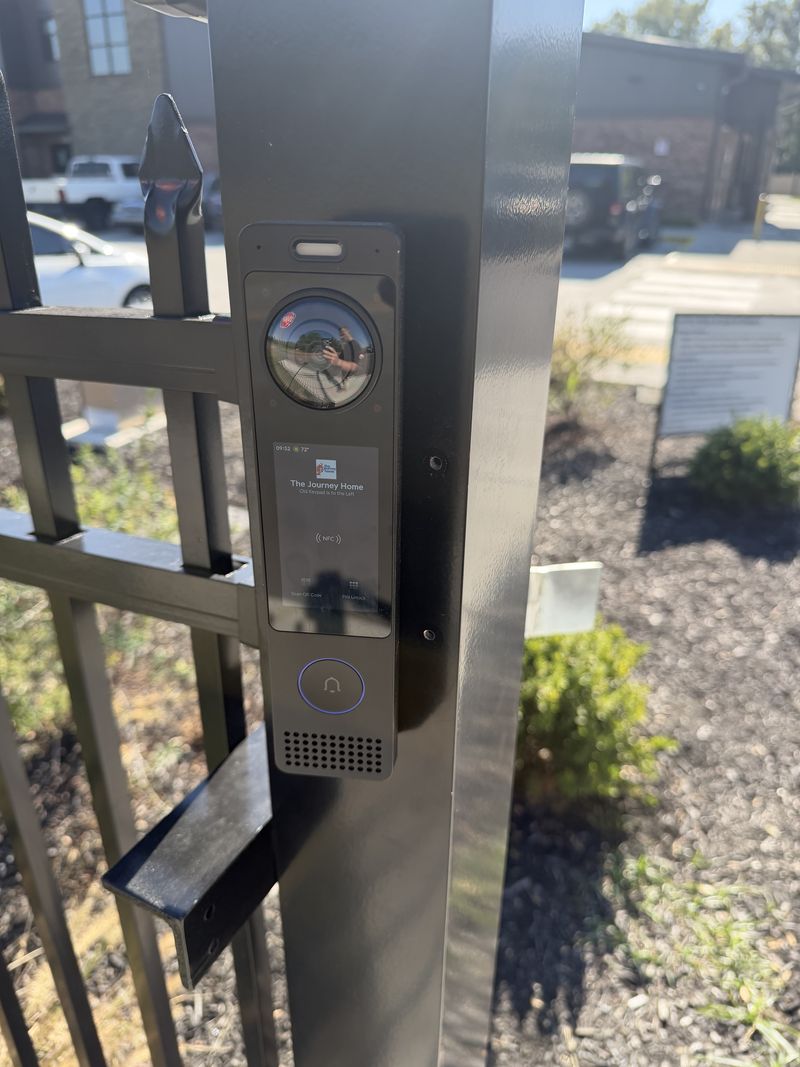
The Journey Home, Murfreesboro
UniFi Access on the building doors and a gate intercom (tap, PIN, QR code or call button), with an automatic vehicle gate for their new parking lot in progress.
From walkthrough to fully managed
Site survey
We walk the building, look at what is there, and ask what has actually been failing you. No charge and no obligation.
Design & fixed quote
A diagram, an equipment list, and one number. You see what you are buying and why it costs what it costs.
Clean installation
Structured cabling, labeled terminations, tidy racks, and cutover scheduled around your business hours.
Handoff & support
We train your team, hand over documentation you own, and monitor the system if you want us to.
Before you call
Can you use my existing doors, or do they have to be replaced?
In most cases the doors stay. What changes is the hardware in and around them. During the survey we look at each door's frame, existing hardware, and how it is used, then tell you which ones convert cheaply and which ones have a complication worth knowing about before you commit.
What about fire code and getting out of the building?
Egress always wins. Doors on an access control system still open from the inside, and maglocks are tied into the fire alarm so they release on activation. This is not an area to improvise in, and it is a large part of why access control costs more than hanging a keypad on a wall.
What happens when someone loses their credential?
You revoke it yourself in seconds and issue a new one. No locksmith, no rekeying, no replacing every lock in the building because one fob went missing. That single difference usually pays for the system within a couple of turnovers.
Can I see who opened a door and when?
Yes. Every access event is logged with the person, the door, and the timestamp. If you also have cameras on the UniFi platform, door events and video line up in the same interface, so you can pull footage from the entry log rather than scrubbing hours of recording.
Do I need to do the whole building at once?
No. Most clients start with the exterior doors and the one or two interior doors that actually matter, then add more later. Because it is the same platform, adding doors later does not mean a second controller or a second app.
Who keeps it updated after the install?
You can run it yourself with the logins we hand over, or add a managed service plan: we monitor it, install firmware and security updates, and make routine changes for you. Plans are month to month and start at $99 a month; see managed service plans.
More on this from our blog
Let us walk your building
Tell us what is not working. We will survey the site and send you a straight quote, and if it is not something we can help with we will tell you that instead.
Black Pearl Automation LLC is an independent installer and integrator. UniFi, UISP, and Ubiquiti are trademarks of Ubiquiti Inc. We are not affiliated with or endorsed by Ubiquiti Inc.